

Hardware synths vs software synths
I’ve owned and played with hardware synths since the 1980s, and software synths since they first came out. The hardware synths vs software synths debate for me is irrelevant. I use both.
Depending on your needs you may find that a hardware synth or a software synth suits you better. In this post, I’ll attempt to use my experience over the years to tell you the advantages and disadvantages of both to help you make up your mind.
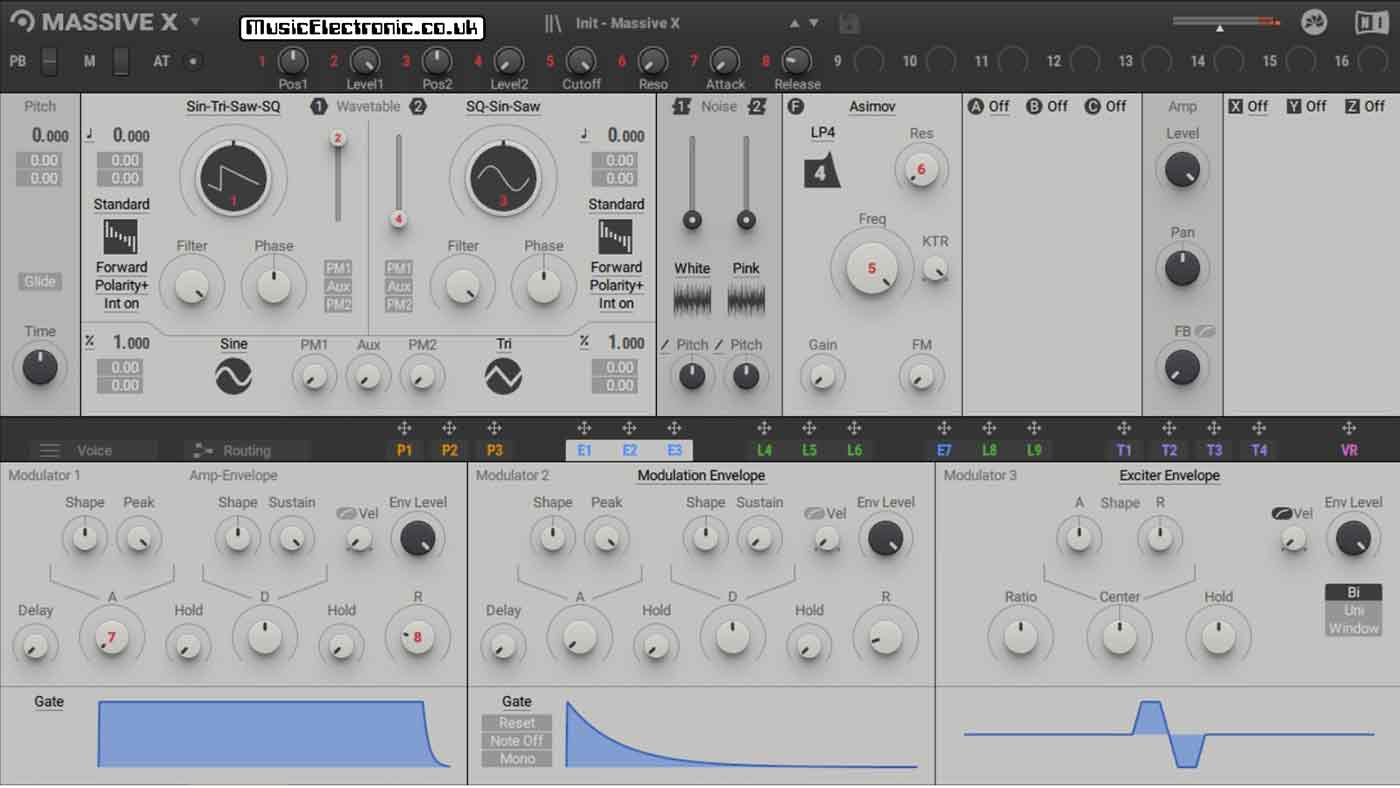
If you want a versatile VST synthesiser you won’t be disappointed with the Massive X by Native Instruments.
Background About Hardware synths
These first became available to the public in the late seventies.
In the eighties, they became more popular due to more manufacturers making them and the price coming down slightly. Although they were still pretty expensive at today’s levels. Hardware synths became popular as the public became exposed to them due to the popular music at the time.
Synth-pop and electronic music exploded in the late seventies and early eighties. I can remember the exact moment I fell in love with synthesizers. It was while watching Top of the Pops and seeing Tubeway Army doing Are Friends Electric?
I knew then I had to get a synthesizer. I was only thirteen so it was going to be difficult. After a year of doing every possible paper round I physically could manage, I bought my first hardware synthesizer the Sequential Circuits Pro 1.
Many hardware synths have come and gone since. They probably will in the future too.
Background About Software synths
The software synth started to appear in the nineties.
One of the first was Rebirth from Propellerheads. Clearly, Rebirth with just a couple of classic drum machines and a baseline (Roland TR808, TR909 and TB3303) wasn’t enough.
This was the forerunner to the Reason software that not only re-creates soft synthesizers but also a whole soft studio!
There was also a company called Seer Systems who were doing something around the same time called the Reality. Dave Smith of the Sequential Circuits Prophet 5 fame had something to do with it.

The Arturia plug-in version of the Moog Modular V3.
Advantages of a hardware synthesizer
This will pretty much depend on the particular hardware synthesizer you have, but in general, you don’t have anything to do other than switch it on.
You can connect it straight to an amplifier and speakers or just plug in headphones and it’s ready to go. Play the keys and there you are.
If you have a workstation type of synthesizer you’ve got something that’s multi-timbral with drums, and effects and you can record complete demos.
You don’t need anything else if you don’t want it. There’s nothing to distract you and it feels like a musical instrument.
Talking about musical instruments you get much more in the way of controls on a hardware synthesizer.
You can set up knobs and controllers on a computer, but it’s just not the same. There is always some setting up that needs to be done. Then there’s the fact you can use the controller knobs for other things depending on how you choose to set it. You can turn a knob and it does completely the wrong thing because of the way you set it up the last time you used it.
The flexibility of a computer and controller can also be a hindrance when you just want to do something quickly.
With a hardware synthesizer, you get used to where all the knobs and buttons are and it all becomes second nature.
It’s like when you drive a car. You don’t even think about what peddle does what. You just drive. That’s what it’s like when you know a particular synthesizer. You don’t think you just do. That’s something I’ve never really got with a soft synth. The connection you have with a physical synthesizer.

The picture above shows my Spectrum synthesiser. Turn it on and it makes sounds. No computer required.
Hardware synths vs software synths – No updates
There is no latency. When you play a note you hear the sound.
With a soft synth, you can minimise it and even reduce it so it’s hardly there but you have to use decent sound cards and you need to experiment and play with the settings.
If you are having any problems with latency have a look and my guides about using ASIO drivers and using ASIO4all.
Also with a hardware synthesizer, you don’t have problems with it updating when you least want it to.
There are some things you can only really do with hardware.
Soft synths can do almost anything that a hardware synth can do. I even admit that they can fool me into thinking they are analogue in sound tests.
Some people say they can tell the difference but that’s another story.
If you’ve got a euro rack modular system it’s going to be unique to you. No one else is going to have exactly the same modules you have.
They won’t set them up in the same way or use them in the same way.
The euro rack you’ve put together becomes your own unique instrument.
Some people will argue that Native Instruments Reaktor does something similar but if you’ve got a euro rack synthesizer system there’s really nothing like it in software. Not the sound or the feel. You’ve got every parameter at the touch of a button or twist of a knob. All in front of you with no screen, just real buttons and knobs.
Disadvantages of a hardware synth
They can be very expensive. Even though hardware synths aren’t as expensive in real terms as they used to be, they still can be a considerable cost.
Then there’s the fact that there’s a lot of hardware. They can take up quite a bit of room too. Again they aren’t as big or heavy as they used to be but three or four will take up a lot more space than three or four software synths.
They wear out
This may not seem so obvious but if you’ve owned a hardware synthesizer, particularly an analogue one, they wear out and may even develop more serious faults.
As I mentioned earlier I had a Sequential Circuits Pro-One and used it for hours and hours. Some of the switches started to wear and weren’t as “positive” as they used to be. Same with the controls. Some got a bit intermittent as they started to wear.
Part of the modulation matrix stopped working. Luckily as an electronics technician, I was able to replace the faulty op-amp myself.
This would have been an expensive repair if I hadn’t been able to do it myself. It’s not like you can just call someone to come and fix your synthesizer like you can with your washing machine.
The keyboard on the Pro-One was pretty reliable however the one on my Oxford Synthesizer Company OSCar had a few intermittent notes. This is something you need to be aware of with a hardware synthesizer.
This is one of the advantages of a software synthesizer
They don’t wear out. As it’s all in software it doesn’t wear out. The laptop that runs it might but you’ll find that a lot easier to get mended if you drop it or spill liquid in it than you would a hardware synthesizer.
The controls and switches on your controller or the keys may wear like a hardware synthesizer but they are easier to replace. New MIDI controllers and audio interfaces are a lot cheaper to replace.
Cost
Software synthesizers or VSTs don’t cost as much as hardware synthesizers.
If you look at the cost of something like a Minimoog in hardware and then the cost of a software equivalent, it’s about ten times cheaper. There are even plenty of free VST instruments if you don’t want to spend any money at all.


If you are looking for a good free VST synthesiser you must check out the Cardinal. This is a plug-in version of a Eurorack modular. It is extremely good even if you had to pay for it but to think you can get it for free is unbelievable!
You usually get more functionality and features with a software VST as well. I was lucky enough to own an Oxford Synthesizer Company OSCar, which was a fantastic hardware synthesizer. The software equivalent has extra things that the original didn’t, like polyphony and an effects section.
They can be more complex
In the last paragraph, I mentioned how software VST instruments that mimic real instruments often add extra features.
VST synthesizer instruments that don’t exist in the real world have stacks of features that hardware synthesizers don’t have. Perhaps I should say can’t have. Implementing extra features in hardware costs more. In software the more things it can do take more time to develop but once that’s done, they can use similar routines time and time again in future software developments.
Software instruments are usually more complex than hardware synthesizers. They usually have more parameters to alter, and you have the advantage of a large colour screen to work out what’s going on.
Hardware synths vs software synths – They don’t take up physical space
You can have a couple of soft synths on your laptop or you can have ten. You won’t need more space in your studio for them. Try finding space for ten hardware synthesizers. I used to have seven all with keyboards and another 5 in keyboard-less racks.
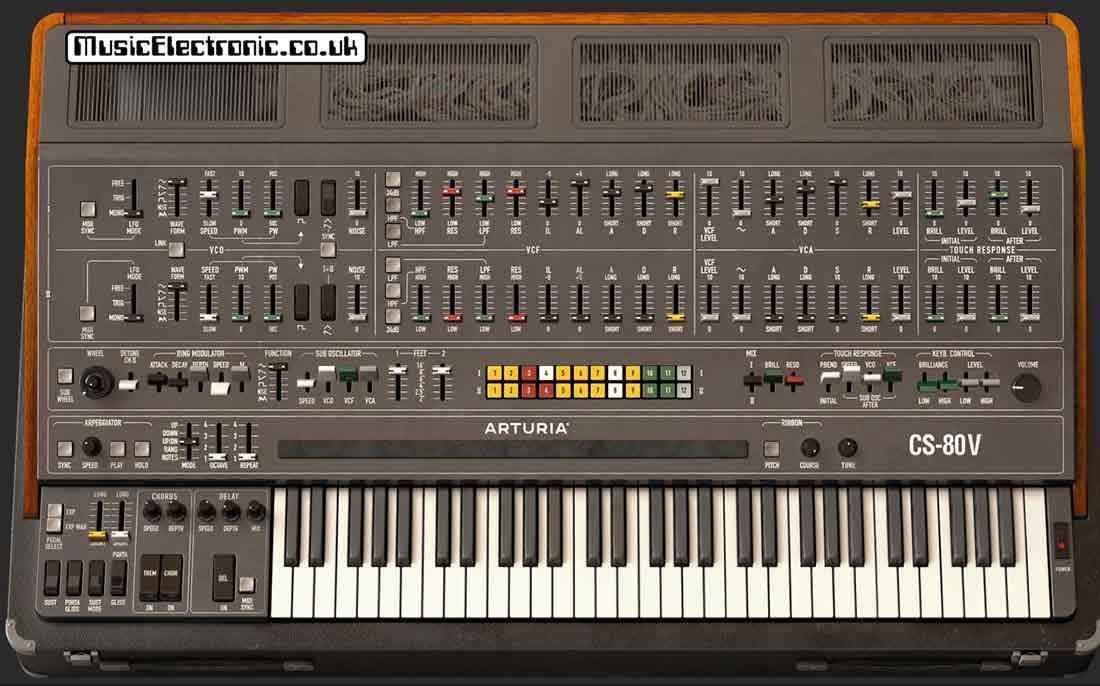
The original Yamaha CS-80 was huge. No, in fact, it was bigger than huge. It was massive and weighed over 80 KG.
Power requirements
This never really used to be an issue but in reality with the cost of electricity today a rack of VST software synths won’t use anything like the electricity that a similar number of hardware synths will.
Hardware synths vs software synths – Sound quality
Again I haven’t seen this mentioned much but as the software synthesizer sound exists inside the software of the laptop and you are recording on the same laptop with other software, it all stays internal.
I use Ableton Live as my digital audio workstation and any software synth doesn’t pass through any hardware to make it through to a recorded track. The software works it all out for you. Your sequenced part appears on a track without you even having to record it in real-time. It’s rendered as all the 1’s and 0’s get put in memory.
If you use a hardware synthesizer, it has to be recorded. If you record onto a computer as many people do today it has to go through the analogue to digital converters on a sound card and various leads and such like with things like noise being introduced along the way.
Some of the older analogue synthesizers also had quite a high noise level compared to the pristine audio of modern synthesizers. It’s not a huge problem but something to consider.
The studio set up itself

Could you ever imagine owning a Fairlight music computer? You can now, well the next best thing, the Arturia VST plug-in simulates a Fairlight amazingly accurately along with lots of the original sounds.
This is one of the main advantages for me. In the old days before computers and software synths, everything had to be set up.
The synthesizers would connect to a mixing desk, as would the sampler and the drum machine. Same with the effects processors. There were cables everywhere. The same with MIDI cables. They would connect all the synthesizers, samplers and drum machines to the MIDI interface and the computer.
Then you had to set the gear up, get the right sounds on the synthesizers, the right patterns on the drum machine and alter the effects processors and tweak the mixing desk. It could take half an hour just to get set up. When you wanted to try something different you had to reconfigure the whole lot again.
With soft synths and a DAW like Ableton Live, you can save every setting and configuration all in one go. Turn off the computer and come back the next day boot it up, load up your DAW open the file and it’s all there exactly like the day before. This just takes a matter of seconds.
You can also take this further of course and you can have a specific template that you use for writing. This can be a particular set-up of sounds and stuff, so when you’re in the mood you can just open it up in seconds.
Also if you’ve finished a song and come back to it a few months later, everything can be saved and recalled exactly as it was when you last mixed it.
This for me is the biggest advantage of using soft synths.
It’s not all a bed of roses though as we move on to:-
What are the disadvantages of software or VST synthesizers?
Hardware synths vs software synths – Latency
If you’ve used soft synths before you will be aware of something called latency.
This is the delay that happens from when you play a note on your controller keyboard to when the sound pops out of your speakers.
This can be anything between 50 to 100 milliseconds if you’ve not done anything about it. This is quite a noticeable time when it comes to playing music. It’s not something you want.
When I say not done anything about it, that’s probably as bad as it gets with your built-in sound card driver. You can update sound card drivers with something like ASIO4all. This will definitely help. You can check out my guide to usingASIO4all here.
Also getting a decent external sound card will help. There are plenty around that have been manufactured especially for musicians using software and computers.

Once you’ve got the correct drivers or sound card, it’s a case of tweaking your system to see what you can get it down to. Sometimes if you get a fast computer you can get latency down to 5 milliseconds or below on a good day.
Hardware synths vs software synths – Windows
The biggest one for me is that you obviously have to use a computer. While at first, this didn’t seem such an annoyance over the years it has become one.
My personal bugbear is that over the years the operating systems have changed. In my opinion for the worse. I used to have Windows 98 (now I’m showing my age) it ran on a very basic computer and ran my soft synths and I don’t really remember having many problems.
Moving forward to today. I have two laptops. One runs Windows 10 and one runs Windows 7. Some of my older VSTs won’t run on Windows 10. Some of my new ones won’t run on Windows 7. Windows 10 doesn’t like it when I want to do musical stuff. It knows when I want to record a song and so when I turn the laptop on, it likes to stop me by announcing it’s going to do an update. Twenty minutes later when it’s ready I’ve lost the idea I had.
Sometimes after an update, some of the software I used to use doesn’t work anymore. I found later after days of searching for answers on the internet that because of a new update, it now doesn’t like a driver or something else.

The picture above is my Quasimidi Polymorph. You turn it on and use it. You don’t have to worry about Windows versions!
The power struggle
Also, if you’ve been using VSTs for as long as I have, you’ll also be involved in some long-term struggle with your machine’s processing power.
When you get a laptop, it’s all fine. You get software like Ableton Live and some soft synths and then you start getting to the limits of what your laptop can do to keep up with all the processing going on inside.
Eventually, you get a newer faster computer. Then Windows bring out a new operating system that needs more processing power to even run itself. Then the new plug-in synthesizer uses 50 per cent of the available processing power using just one note. And so it goes on.
Sometimes computers can be a real pain. I found several ways around all of these issues now. If this is something you have a problem with you can read my post here.
What sounds better hardware synths or software synths
The big question. Well in my experience I think soft synths sound better in a lot of instances.
Firstly I’m not in the “analogue sounds better camp because it just does.”
I have been recording music since the early eighties and striving to get the best sounds and quality. I remember when digital recording came out. It was so clean and quiet, so much better than analogue and you could copy it and it would be identical and not wear out like vinyl or magnetic tape.
I know some people prefer the sound of vinyl or analogue or whatever over digital and they say that digital sounds too clinical.
I think what they like is the slight colourations and distortions that analogue adds. Distortion done properly and subtly can add some brilliant colourations to sound. This can be added to sounds in a precise and controllable way.
You can create these imperfections in digital sound. I like the option of either so I think software synths sound better.

Some hardware synthesisers are basically soft synths anyway
This is completely true. A lot of modern hardware digital synthesizers are just computers in a different box, they just have dedicated memory and microprocessors, and the sound is still basically a computer generating ones and zeros.
Whether it’s done by a processor on a hardware synthesizer or the processor on a laptop it’s the same.
The only thing I would comment on about this is analogue synthesizers. They make their sound with oscillators and filters which are electronic audio circuits that all interact in the most complex and sometimes unpredictable ways.
Some of these things just can’t be copied. So I’ll concede that some people can tell the difference between an analogue synthesizer and a software simulation of one.
Sequential Circuits Pro 1 and the U-he Repro 1
I have had the pleasure of owning a Sequential Circuits Pro 1 and it was a fantastic analogue synthesiser. I now use the U-he Repro 1 (how good is that name for a product that reproduces the Pro 1.) It captures the sound of the Pro1 as I remember it. sometimes it’s hard to remember you’re not using a “real” synthesiser.

When I first played around with the plug-in I was amazed at the similarity. I’d used a Pro 1 for over ten years and felt I knew it like the back of my hand. Then when I went through some of the presets, I heard sounds the Pro 1 couldn’t make!
Upon closer investigation, there is an effects section that you don’t get with the original synthesiser. One of the modules is a kind of wave folder and that’s where these different sounds were coming from.
Hardware synths vs software synths – Summing up
As you can see there are lots of reasons why you would want a hardware synthesizer and lots why you would want a software one.
If you remember at the beginning I said in the hardware vs software debate my answer was both. Like many people who are interested in synthesizers for any length of time, they happily use both.
Luckily there’s no law that says you can’t have both or you have to be on one side or the other. However, if you’ve made it through this post you will now be in a better position of knowing what suits you if you are starting out with hardware and software synthesisers.
If you are looking to buy your first hardware synthesiser, be sure to check out my best beginners synthesiser post.
Tip
On a final note, if you are starting out you will undoubtedly have access to a laptop. Get one of the free software synthesisers and try one out.
You’ve got nothing to lose and you may find that it does everything you wanted and it hasn’t cost you a penny.
You may be like I was though, and find synthesizers fascinating and then go on to spend thousands of pounds and thousands of hours using them.