

Best Ableton controllers
Firstly, I have two MIDI controller keyboards and various MIDI controllers with control knobs and launch buttons but I’m always looking for the best Ableton controllers.
I don’t want to miss out on anything new or better and if you haven’t tried them yet MIDI controllers of all types are a great way to increase not only the speed of your workflow but also the things you’ll attempt. I also like to do a hell of a lot of research before I part with my money. As I do actually own and use MIDI controllers already I know exactly what in looking for and what I specifically need.
As I mentioned I’ve done a lot of reading to try to get exactly what I want. So my guide will help you choose a MIDI controller for your exact needs by going through the processes that I did in considering what features you need and what you can afford to pay. Then you’ll get something that suits you rather than looking at a list that someone wants you to click on.

You may not even need a MIDI controller. I made use of my Hohner HS-1 sampling keyboard. You can use the keyboard as a MIDI controller via the MIDI output. A lot of sound interfaces also incorporate MIDI ins and outs. With these, you can connect your MIDI stuff to the computer.
You may also find that the knobs and sliders transmit data as well, so you can use those. You may need to delve further into setting up MIDI controller devices but you could save yourself having to buy something else.
Hardware controllers
MIDI controllers really do bring you into the world of tactility.
It’s amazing what a few buttons and control knobs can do. Even just things like dedicated play and stop buttons speed up the way you work. Then when you start integrating things like filter and ADSR controls. It gets even better. If you’ve never tried it you are severely missing out. All these controls make using the software so much better.
It’s like when you drive a car. You get so used to the pedals and gears you’re not even aware of what you are doing. It becomes subconscious and an extension of you. Imagine if you had to control a car with a mouse and screen!
I come from a time when everything was hardware. There were synthesisers, drum machines and sequencers and to operate them they had knobs and buttons.
Computers were a few years away and then they were going to be things like Sinclair Spectrums and Commodore 64s. For me computers equal work and synthesisers equal play. I can tolerate the monitor but for me the further I can get away from the mouse and computer keyboard, the better. MIDI controllers really do take you away from the computer. If not completely, at least enough to start making VST synthesisers and effects seem “Real” and not just something that happens inside your computer.
With a MIDI controller keyboard, your VST can almost become an instrument and with a MIDI controller-like launch you can play your sequences. In reality, a MIDI controller keyboard and a VST aren’t a million miles away from a hardware digital synthesiser anyway. In some ways, you have more control over some hardware synthesisers.
Just have a look at the old Yamaha DX7 if you need reassurance of that.

Just a few buttons and knobs can transform the way you produce music. Especially in speeding up your workflow.
What things can you get?
There are plenty of things you can get to aid you in your music production.
If you want a preview of just what buttons can do, you can assign your computer keyboard keys to do various functions. It is a lot more fun than using the mouse. Just try setting a few markers on the arrange page and then set some computer keyboard keys to trigger them. Click play and then rigger them.
Isn’t that better than using a mouse? Now imagine if you had a dedicated pad to trigger whatever you wanted. If you haven’t guessed yet what I’m describing is a launchpad for Ableton. If you haven’t seen them you’ll be very pleasantly surprised at how good they are. Looks-wise, they are a grid of buttons. They are specifically designed to launch clips in the session view of Ableton.
If you can picture the session view you’ll comprehend how it all works. Just to make it all even better the buttons light and you can set most of them to match the clip’s colours. Not only does this look fantastic, especially performing live, but it also helps enormously in knowing what you’re triggering.
There are also various other functions that you can set up and each is specific to the model you get. They vary in price from several hundred pounds for an Ableton Push 2, down to under £100 for a Novation Mini, which is quite reasonable, not only when you consider the hardware you get but putting that to one side, you’ll realise once you’ve tried one, how it soon becomes part of the software and you feel lost without it.
Best Ableton controllers – Mixing
You can also get various controllers that are to help with the tactile job of mixing a track.
Getting the volumes balanced, the panning right and applying effects to the sounds. While I’ll be the first to admit there’s nothing like a huge functioning mixing desk to do this job (I used to have a large Sound-master console) the smaller controllers are infinitely better than using the mouse again.
Once again, you are spoilt for choice in this department. There is the PreSonus Faderport 16 costing around £750, at the top end and the Akai Professional MIDImix will do a job for less than £100.

With 16 knobs the Evolution U-CONTROL UC-16 is useful for mixing, although some people prefer faders.
Best Ableton controllers with knobs on
If you’ve ever used a proper hardware synthesiser you’ll know how important switches and control knobs are.
They transform it into an instrument, something that you can play rather than operate. I grew up with hardware analogue synthesisers so although I was impressed with the VST versions they didn’t really feel “real”.
Dedicated hardware MIDI controllers
There are a few hardware controllers for VST synthesisers that are built almost exactly like the hardware synthesiser. If you are familiar with the VST OSCar from GForce, you can find a MIDI controller that looks a bit like the original OSCar.

I was lucky enough to own an OSCar. I bought one almost as soon as they came out. Mine had the serial number #499 written in blue ballpoint pen on the plywood bottom. The OSCar is a fantastic monosynth. In my opinion, the best one made. Using a controller with the VST in my opinion is better than the original OSCar. What! you must be mad, I can hear people say, but stay with me here.
The OSCar didn’t have the greatest keyboard. It wasn’t as good as the Sequential Circuits Pro One mechanically, and after a few years of OK, heavy use, a couple of keys had become intermittent. Also sequencing with it wasn’t as quick as it could have been. Probably due to the processor being pushed to its limit.
With the controller, it all feels a bit more solid, for want of a better word. While it would be prohibitively expensive getting more than one of these types of controllers, you can easily get a cheap and cheerful 16 knob box, that will still give you plenty of functionality. Just to be able to turn one control to set things and perform filter sweeps is about a hundred times better than a mouse.
Having 16 to set up your ADSR and filter stuff is so much better. I have used an evolution one for years.
Best Ableton controllers – Keyboards
I’m not going to go into too much detail here as there is more than enough information for an article of its own, which is exactly what I’ve done here.
The thing with keyboards is that now the top-of-the-range ones integrate so many other controllers, you could use one of those and not need much else. That’s the reason I’m covering it here, as you need to consider if you can make do with just a keyboard controller and the other controls that it offers.
There are advantages. You only need one unit, which for some people is what they want. Especially if you want the ability to move it around. On the other hand, if it’s a studio set-up you’ve got, you might like all the separate controllers because you can set them up exactly where you find them the most comfortable to use.
Some of the newer keyboard controllers are amazingly good. You may find it very easy to fall in love with them as I indeed have. I’ll just say Native Instruments Kontrol S61. Just go and read the MIDI controller keyboard guide here.
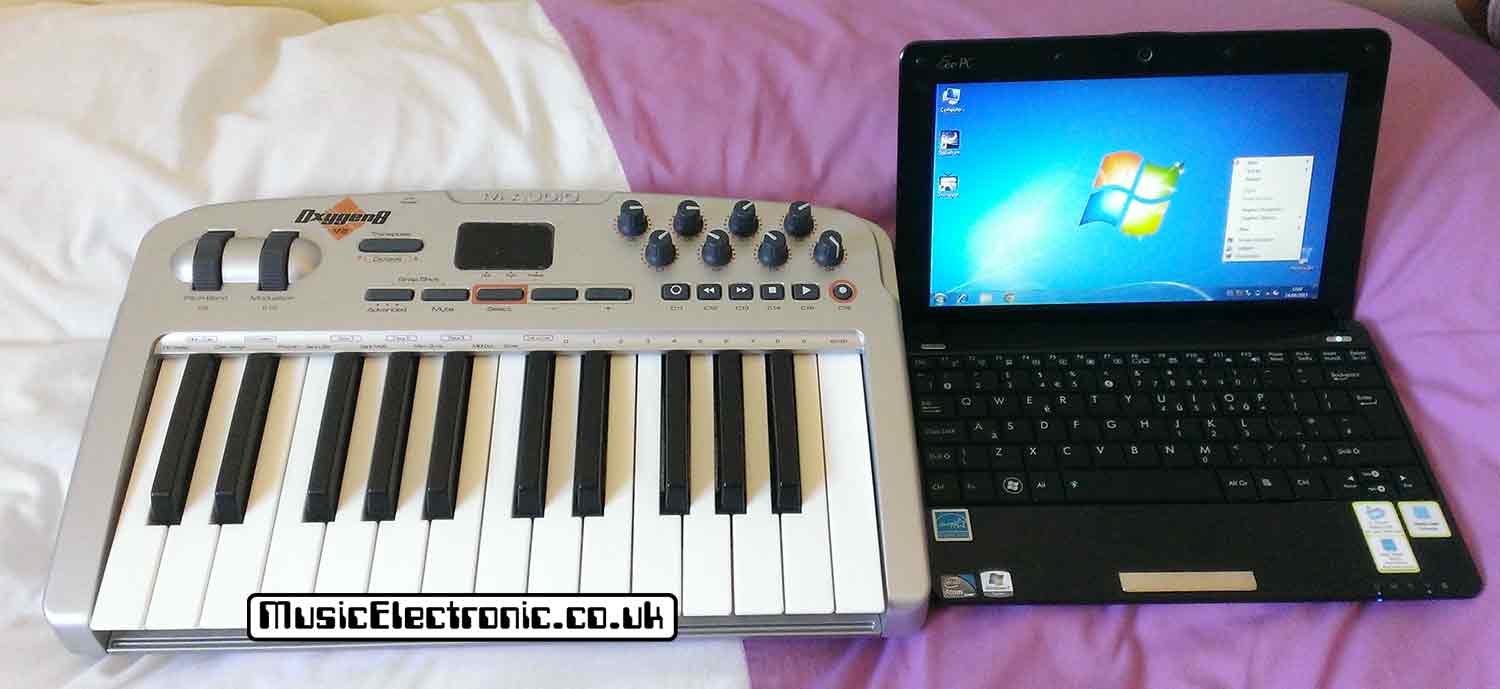
This was my MIDI studio for a while when I was severely restricted to space. It all got packed away into a rucksack when not in use!
Best Ableton controllers – What are your needs?
Mine were pretty obvious to me. I wanted at least a four-octave keyboard. I’ve got a four-octave Novation ReMOTE 49 LE and a two-octave M-Audio Oxygen 25, and for me, the 2-octave keyboard is too small.
I had a hardware synthesiser that had a 5-octave keyboard and the only thing that stopped me from wanting an 88-note one is size. I just don’t have the room at the moment. Also, I need at least 8 control knobs I’ve got an Evolution model with 16 and that would be preferable but not essential.
I would also like plenty of buttons. I like to assign them to do various things. Dedicated points in a song for instance help move around an arrangement quickly. I seem to use all the available ones up pretty quickly.
You will probably have to set up a MIDI controller once you get it. For more information have a look at my guide to setting up MIDI controllers in Ableton.
MIDI controller keyboards and browsing presets
My old MIDI keyboard controllers don’t seem to be able to do this function. It seems odd as it’s one of the most useful things to be able to do with a controller.
Looking at video demos of the new ones, especially the ones I’m considering, it seems as though it’s entirely possible to do it with a lot of them.
Build your own MIDI controller
If you can do some basic soldering, it’s not out of the question to build your best Ableton controller.
It’s certainly something I’ve considered but not yet taken the plunge due to time constraints. There are various articles and videos on the internet if you want to consider it further. Most of them use some form of controller like an Arduino to take care of the hard stuff. You just have to wire up your controllers.
The advantage of this is that you can have as many controllers as you like. You can put the switches and knobs where you want. This is the main attraction for me and building something like the OSCar controller would be fantastic. It would definitely help with programming and recording VST synthesisers.
Best Ableton controllers – Final thoughts
I’ve not listed many products here. It’s more to show you what’s available and what may suit you, an integrated keyboard rather than a separate MIDI controller for instance.
Hopefully, you find this more useful than a list of Amazon products someone has taken half an hour to compile without actually seeing a MIDI controller never mind actually using them.
You may not agree with the stuff that I say and that’s fine. I don’t agree with everything others write but at least you’ll know that at least I use MID controllers launch pads and keyboards.
If you’re struggling to come up with ideas have a look at the Sundog Song Studio. This can easily be integrated with Ableton with sync and stop-start. Then you can record MIDI-generated patterns from Sundog into Ableton.