

How to choose the best Ableton keyboard
This guide will show you how to go about getting the best Ableton keyboard for YOUR needs.
Some people consider MIDI controller keyboards to be optional items. Instead, they prefer to input notes into their preferred digital audio workstation (DAW) by other means.

For me the MIDI keyboard is essential. Probably because I came from a hardware background when music technology didn’t have computers. My first synthesiser had a keyboard and it was how I used it.
Once MIDI and computers came on the scene, I of course joined the party, (after all, I’m no Luddite).
Using MIDI out on keyboards
I didn’t see the need to buy a MIDI controller keyboard straight away though as my favourite keyboard was A Horner HS1.
This was a sampler with a five-octave keyboard. Not only that but it was my favourite keyboard on which all of my songwriting and programming was done. In those early MIDI DAW days, the note input was the main thing and you wanted your keyboard to feel like an instrument. As time went on the MIDI controller keyboard evolved. It had to become more integrated into the way we produced music with our DAWs.

Gradually more controls were added and transport controls became normal. Having dedicated buttons for the transport certainly improved my workflow. Many will know I’m not a fan of the mouse. It’s great for some applications but not in my opinion, for music! Control knobs then became essential to control all those powerful VSTS that started to become available.
One of the main problems though was the setting up of the MIDI keyboard. Many MIDI controller keyboards started to add preprogrammed templates to make it all a bit easier. The problem was though that software and VSTs moved so quickly that many templates on hardware controllers were quickly dated and new VST plug-ins weren’t catered for.

Also, the templates didn’t suit everyone. Call me picky, but I usually had to change something to the way I liked it. The best way to approach things was to learn how to set it up yourself. It can be quite daunting staring at your keyboard and looking puzzled at the array of buttons. To help you out I’ve written a guide to setting up MIDI controllers for DAWs.
The new MIDI controller keyboards
One of the things that I could never fully get the hang of when it came to MIDI controller keyboards was how to use any of its controls to step through presets.
I’m not totally sure whether it was down to my stupidity or whether the gear I used could actually do it. I’m going to go with the suggestion that the equipment couldn’t do it for the sake of my ego. It does seem like this issue has been addressed by the manufacturers and this feature has been included.

The ability of a controller to more fully integrate with the DAW is a major time saver and once you get used to a good one you don’t want to go back.
How many notes do you want?
This sounds easy, but it’s not. I would have said as many as there are, so 88 notes.
With experience, there are two drawbacks with an 88-note keyboard. Firstly, its expense. You pay more for a bigger keyboard. More keys equals more hardware, so it’s going to cost more to make and cost you more to buy.

If you don’t need an 88-note keyboard then why pay for the keys you’re not using? It all depends on the individual and your needs. If you are a trained classical pianist then you’ll probably look down on anything less than the full 88 keys.
Secondly, there is the size. If you’re not familiar with an 88-key machine, be prepared for a shock. Not only are they long but some can also be quite wide, and did I mention heavy? I don’t have enough room for an 88-key controller, so it’s out of the question for me.
My minimalistic setup
For a time I lived in a box room. Barely big enough for a bed, let alone any audio equipment. You always find a way though. I had the idea that I could fit my “home studio” in a rucksack. I bought an Asus Eee PC netbook with an 8.9-inch screen and a two-octave Oxygen 8 MIDI controller keyboard. As you can see from the picture it all fits in a rucksack and all in all a functional system.
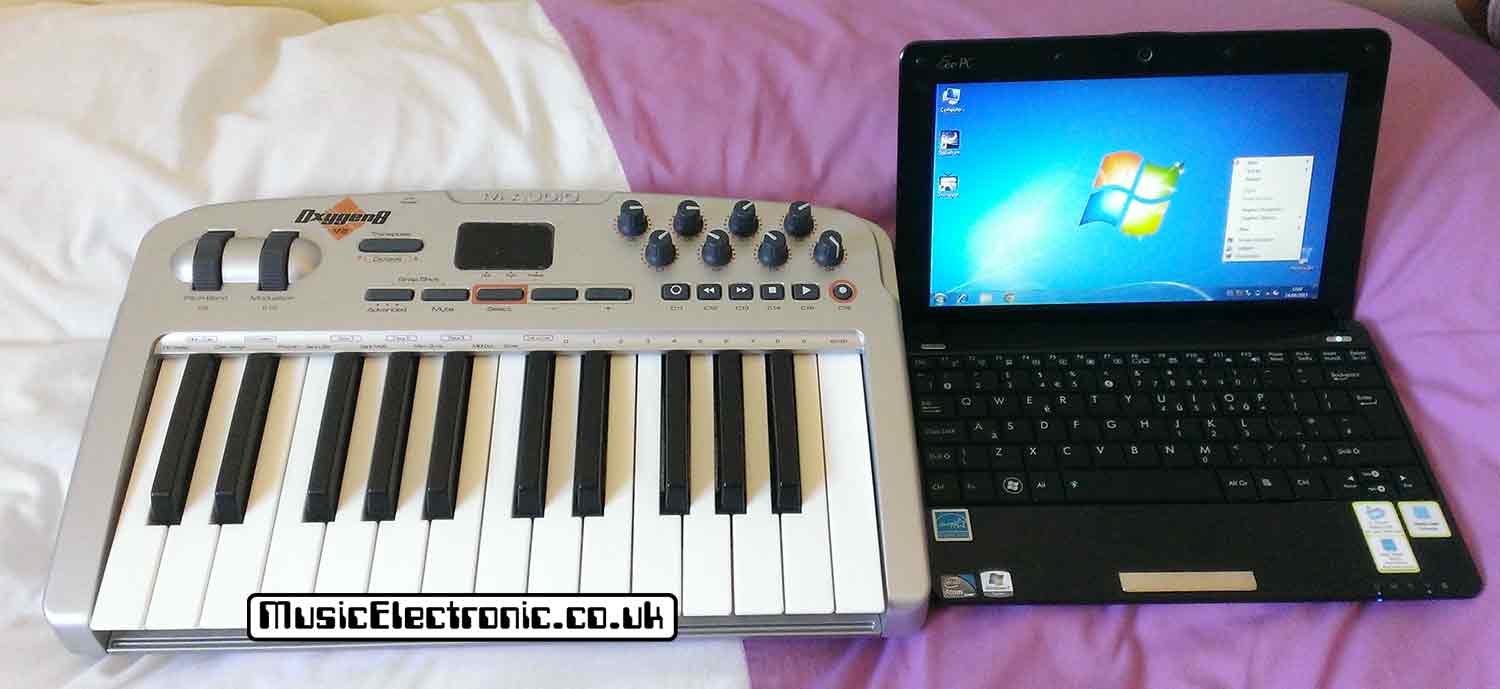
The main problem was I found the keyboard too small. M Audio have made the Oxygen about as easy as you could to switch octaves with those buttons right next to the controller wheels, but it just wasn’t for me.

I got used to 3 octaves with my Sequential Circuits Pro One, but my preferred keyboard size is definitely 5 octaves.
Your needs may be completely different but at least I’ve made you aware of things to consider.
Native Instruments Kontrol is the best Ableton keyboard
I can save you a lot of time if you are looking to buy a new MIDI controller keyboard I’ll tell you that in my opinion, if you have the money the Native Instrument Kontrol is the best I’ve seen.

It is so good in many ways. If you’ve seen any of them you can’t help but love their looks. It cost a lot but looks like it should. This is secondary to its use though. I’ve not seen anything that fits so well with software. If you use DAWs a lot you’ll appreciate its smoothness in doing stuff.
Everything should be like this but it’s not. With technology, you can quite often feel you are fighting against it. Especially if you want to do something in the way you want, but the gear wants you to do it another. Frustrating! You can get the Native Instruments Kontrol in different sizes depending on how many keys you want (or need).
What else if you can’t afford a Native Instruments Kontrol
Fortunately, there are alternatives if you can’t stretch to the funds you need for the Kontrol.
I’ll still reiterate though, that they aren’t as good as the Native Instrument. This is one of those times where for me the extra cash is well worth it. Over the years I’ve spent a hell of a lot on music technology and some of the amounts were, well let’s not go there. There are plenty of alternatives made by the usual manufacturers. M-Audio, Akai, and Novation. Arturia and Behringer are newer but also established in manufacturing.
There really aren’t many duds around in terms of equipment. Certainly not like it used to be in the MIDI controllers for more information.eighties and nineties. I ended up some some right rubbish in those days! Today though, there are much more stringent levels to get through before manufacturers even think of putting a product out.
For the consumer, this means that it’s hard to buy rubbish but it still doesn’t mean that a product will suit you.
Do bear in mind though, that there is a wave of new manufactures. You only have to have a look on Amazon. They have a large range of MIDI keyboards.
Some of these are very cheap and if you want to take a gamble it’s up to you. Personally, I wouldn’t bother and I’d much sooner buy from one of the established companies.
The Arturia Keylab Essential MK3 is the second-best Ableton keyboard
If I couldn’t afford the Native Instrument Kontrol, I would seriously consider the Arturia-Keylab Essential. Especially the MK 3 versions.

Of all the keyboards I looked at this is the definite second place one. In some ways, it does better than the Kontrol. As I’m always struggling for space the Arturia is better as it’s not much bigger than the key size required for the number of notes. There’s not much spare around the sides like the Native Instrument one. You also get pads for recording drum sounds and talking of controls, there’s far more than the Kontrol!

I feel like I’m talking myself into this one instead! Seriously though, the Kontrol is the best but if you can’t afford it get this instead.
I also have a tip for you that definitely applies to something tactile like a keyboard. Tactile things can be very much like Marmite. What one person may love, another may hate. So here’s my tip.
Tip
If you can, try out the MIDI controller keyboard that you are interested in. If you have a friend that has one, have a try of that.
Failing that go to a music retailer that has keyboards to try out. This may mean a longish journey but if it stops you from ending up with a controller you are not happy with, it was worth it!
Final thoughts on the best Ableton keyboard
There are a couple of things to think about here and I touched upon it in my article about MIDI controllers as opposed to keyboards.
Do you want a single device, like a MIDI controller keyboard that also has knobs to alter VST stuff instead of a mouse or do you want the keyboard to be basically just that and have other boxes and launchpads to do the other stuff.
If you are unfamiliar with what you can do with other keyboardless controllers then check out my article on MIDI controllers for more information.
If you want to get the best Ableton keyboard then it’s the Native Instrument Kontrol.