

Chorus plug-ins roundup
This chorus plug-ins roundup covers plugins that I’ve used in Ableton Live. I give my advice and experience in which I think are the best and why.
Chorus plug-ins are just one of the multitude of effects available to augment your recordings. If you are new to recording you should have a look at my guide to recording effect plug-ins.
A chorus peddle was one of the first effects I bought. It was the Boss CE3 to be precise. I bought it almost as a direct result of my friend having a Roland Juno 60 synthesiser. This had a chorus effect built into it. It was also one of the reasons it sounded so good. I wasn’t disappointed by my CE3. In fact, I used it for lots of sounds.
Even on vocals. Chorus is quite useful on vocals if you use it in a specific way.
You will almost certainly have a chorus effect on your digital audio workstation (DAW). Have a play with yours so you get a feeling of how to use it and what sounds it’s effective on.
You may find though that once you get into advanced use of it where you need it for specific purposes you haven’t got the control you need. In this case, you may need to get a chorus plug-in.
Chorus plug-ins roundup: An introductory to the chorus effect
The chorus effect takes a sound and tries to make it sound like two or more sounds playing at the same time.
The traditional method of doing this was with a very short delay and modulating this time delay. If you take a very short delay, something around 40 milliseconds, you can just start to perceive the delay. This is the traditional “slapback” echo that was popular in early pop music recordings. If you vary the delay time or modulate it you produce the chorus effect.
These are the basic controls on a chorus effect. The modulation speed and the modulation effect. Some also have a feedback control where some of the output is fed back into the unit. This starts to add a colourisation to the sound and starts to head into flanging territory.
Colourations and side effects: Chorus plug-ins roundup
Before we had digital delays it was done with analogue delay lines.
Without going into the mechanics of the analogue delay lines they created some audio artefacts to the sound as a bi-product of the delay. They weren’t able to produce the pristine sounds of digital but as a result, these imperfections became part of and sort after.
This isn’t unusual with recording equipment. Years ago when audio recording was in its infancy. We weren’t able to record to the high standard we can today. Tape machines introduced wow and flutter and hiss, as well as certain tonal changes. Sounds altered when they were processed by valves and transistors.
Audio compressors were designed to limit audio peaks but also introduced a “Sound” to the signal. In those early days engineers tried to produce equipment that just recorded or equalised or compressed or delayed but it wasn’t possible and it all produced tonal changes, not the neutral sound that was wanted.
Now it’s those side effects that people want. There’s not as much want of a neutral-sounding compressor or EQ. People want the sound that these devices made. It’s the same with recording.
You can capture a recording now at a 24-bit 96khz sampling rate at home. But there are plug-ins that recreate wow and flutter and tape hiss. This is the same reason you can get chorus plug-ins that try to sound like the hardware of the eighties.
Arturia Chorus Dimension-D

This is one of those plug-ins that emulates an older hardware device.
The device in question was the Roland SDD-320 Dimension-D. This was a chorus device that was designed to add spatial effects to mono and stereo sound sources. It does this without the modulation side effect that other chorus units create. The plug-in stays faithful to the original with the same buttons. It is simplicity to the extreme. Basically, you can bypass the effect or select 1 of 3 buttons.
These are known as radio selector buttons after the ones that used to be on old transistor radios (if you’re old enough to remember those) you press 1 and the button goes in you press 2 and this deselects 1. The fourth button is different as this is on or off and doesn’t deselect the other 3. The fourth button adds more wet signal.
To me, the effect is quite subtle and there isn’t any detectable modulating or “swishing”. If subtle is what you are after, this chorus is very subtle but does add to the original.
Selecting advanced brings up a further “rack” beneath the unit. This enables you to select an oscillator shape for the modulation source, a dynamic colour selector and a variable width and mix control. These do enable a stronger sound however the movement or modulation is apparent.
I just found a real hardware version of the Roland SDD-320 and it was for sale at over $1,500.
Arturia Chorus JUN-6

Also by Arturia is the Chorus JUN-6. Also an emulation of a hardware device.
If you have ever seen or been lucky enough to own a Roland Juno 6 or 60 (my mate had a Juno 60) you’ll recognise the graphics on this plug-in instantly, it’s visually perfect and brings back a lot of memories. If you’re not old enough to remember the Juno 6 and 60 (and later the Juno-106) were renowned for how good the chorus sounded so it’s no surprise that someone has recreated it.
There are buttons typically Roland coloured to select between the modes I, II and manual. If you choose “manual” you can then use the sliders. Also typical of the Roland style. These are rate, depth and phase. You can also try out the various presets.
This plug-in gives you a bit more “effect” than the previous Dimension-D. If you are looking for a recreation of the Juno chorus effect, this is precisely what you get here.
Tritik Echorus
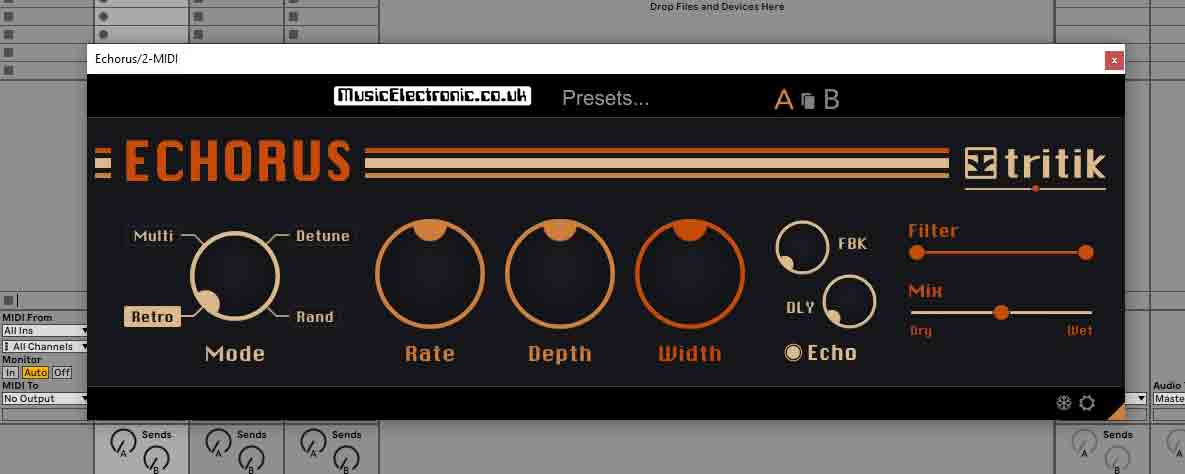
The first thing you notice about this plug-in is how large it is graphically.
It’s like it’s been magnified. It has the standard chorus effect of rate depth and width as well as a selector for multi, retro, detune and rand for the mode. This gives you the bulk standard chorus effects. It also has an echo effect with feedback and delay. There are 2 sliders that control the mix between wet and dry and a filter slider that turns down the wet signal.
There are lots of different presets that come with this device. Bank A are the standard ones while Bank B are a bit more extreme. If you want even more experimental ones, then go to the designer presets.
Voxengo CRTIV Chorus
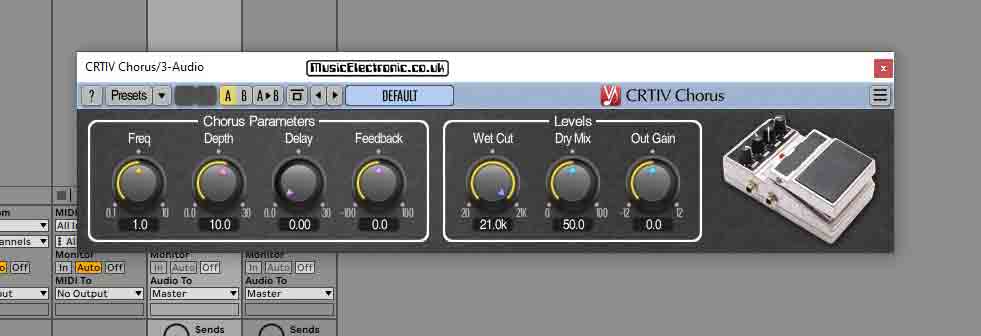
This plug-in goes beyond the standard chorus controls and adds a couple of others that we haven’t come across yet in the previous chorus plug-ins.
Earlier in this guide I mentioned that the chorus effect is produced with a short delay. This plug-in enables you to vary the delay time manually. You can also do this with the frequency and depth controls.
There is also a feedback control which starts to move into flanging territory and adds a colouration, for want of a better word, to the sound. You can get flanging effects by reducing the frequency and depth controls to zero and turning the delay and feedback controls up.
As with the previous plug-ins, there are presets but not as many as the others here. With the addition of these feedback and delay controls this plug-in can produce some strong chorus effects.
Caelum Audio Choric

Choric is a versatile, pure-sounding chorus unit, filter and pitch shifter.
The filter can be hi-pass, low-pass or bandpass and it has cut-off and resonance controls so as you can see it’s quite versatile (more so than many of the filters in early mono synths!)
The pitch shifter can shift between an octave higher or lower and you get the option to preserve
formants (basically the chipmunk effect of speeding up voice sounds.)
The chorus is one of the most versatile we’ve looked at. Along with the usual modulation controls of rate and depth, you can change the modulating waveform. Along with the waveform is a random modulation which does its best to remove the cycling effect that you can get with chorus. There is also a “sync” button.
This sets the modulation dependent on the tempo set by your host DAW. This can go from1/32T to 32 bars. there is also a very interesting phase control. You can see its effect on the display. If you set the voices control to 2 and the waveform to triangle and the phase control to zero, you’ll see a blue and green waveform on top of each other.
This is because they are in the same phase. As you turn the phase up, you’ll see the two waveforms (blue and green) move out of phase. If you increase the voices past 2 you see multiple phases. The effect sounds like nothing I can put into words, so it’s best to give it a listen. That goes for the looseness control and the spread. They just do things to the sound that’s good!
Tip
To get a good vocal sound, you need a decent recording to start with. I’ve found a good place to record my vocal tracks that sounds surprisingly good.
Unusually, it still sounds natural on vocal sounds. You also have dark and warm buttons to alter the sound even further. The useful display gives you a good indication of what’s going on as you change settings.
As you can see there are loads of settings, especially for a chorus device, however, it’s no use having loads of settings if they just give you loads of variations to a bad sound. They don’t. In my opinion, this is the best-sounding chorus plug-in I’ve tried. For me, the best test is on vocals.
You can throw any old sound through an old chorus, but try vocals and you’ll start to hear the defects. These used to be part of the charm but if you want the choice of chorus without the side effect this is the best I’ve found. There are also loads of presets. not just loads but loads of useful ones that sound good, and benefit the source material.
They are also arranged in banks, vocals, keys etc. That’s not to say you can only use them for those applications (you know I always tell you to experiment) they do however provide a good starting point.
Native Instruments Choral

Finally, we have the Native Instruments Choral.
If you have any experience with plug-ins, you’ll know that Native Instruments only do great plug-ins. You’ll be happy to learn that Choral is no exception. In looks, it’s quite similar to their Raum reverb. There are also a few others with a similar look and feel (all worth checking out.) The look is very modern and appealing.
From the off, it draws you in and makes you want to use it. Similar to the Raum, it looks like a real device. By real, I mean it looks as though it exists in the hardware world. (It actually doesn’t of course!) Along with the standard modulation rate and amount controls, there is feedback control. The delay can also be altered and there is a “voices” control that goes between 1 and 3.
There are also width and mix controls. So how does it sound, in a word impressive and in another word clean. I very much favour the newer chorus plug-ins sound, rather than the ones that set out to create classic hardware effects. This is probably because I grew up fighting against so many of the old side effects that audio equipment produced and I like not having to do it any more. There are loads of presets, again ones that are actually useful for music production.
Final thoughts: Chorus plug-ins roundup
I’ve previously written about using chorus effects on vocals. It’s not quite as simple as just turning on a chorus effect. Vocals are much more picky when it comes to chorus.
This is probably due to the fact that a vocal comes under much, more scrutiny than other sounds. You can get away with a lot on some sounds, these defects even become part of the sound. It’s not so simple with vocals, especially if you want a natural sound, but still take advantage of the things that chorus adds.
As you can see, from this Chorus plug-ins roundup there are quite a few available, in addition to what you get with your DAW.
If you crave that old vintage sound, there are some here that will be right up your street. I must admit though, I’m more of an advocate of the cleaner-sounding, neutral chorus units. Don’t make the mistake of thinking neutral means boring because it doesn’t. Of course, reading is great to give you some knowledge, but it’s not a patch on actually hearing the devices yourself so I’ve recorded a video to give you an idea of what they look, feel and sound like.
Personally, my two favourite plug-ins are the Native Instrument Choral, because of its look sound and simplicity of use, you can quickly get what you want. The other one, and my personal favourite by an inch is the Caelum Audio Choric. On vocals, I don’t think there’s a chorus device that comes anywhere near it. It’s not exclusively good for vocals either.
If you can’t get a great and usable chorus sound out of the Choral, then chorus my friend, probably isn’t the effect for you! This brings me nicely to the subject of other effects.
If you are a beginner be sure you’re not missing out and have a look at my complete guide to effects for the beginner. If you are a bit more experienced you should have a look at ducking reverb for “that” particular vocal reverb sound. (the one that took me ages to work out.)
Now you’ve got your chorus needs taken care of have a look at my best reverb plug-ins roundup.