

Chorus effect on vocals
The Chorus effect on vocals was one of the first things I started experimenting with. When I first started recording at home, chorus was the second effect unit I bought. The first was a spring reverb.
The chorus was a Boss CE3 stereo chorus peddle. Although primarily a guitar peddle, I used it on lots of things. Vocals firstly.
As I wasn’t that good a vocalist. I used the reverb first and then the output went to the stereo chorus. Incidentally, you get different sounds depending on how you connect units up. A reverberation after chorus is different to a chorused reverb sound.
For more information have a look at my using effects for beginners.
Traditionally, it is taught, not to put too much chorus on a lead vocal. This is because it can smear it and you can lose definition. Also, it goes against the rule of having it sit centrally in the mix. This can make it distant when you want the vocal to be the main element.
Well, I’m always saying experiment and do what you think sounds best to your ears. Don’t just follow what is supposed to be the best way. I’m pretty sure that my vocals sounded better with stereo chorus after the reverb.
If you want to experiment with adding chorus to vocals. I’d start with a mild effect first so you don’t want to have too fast a modulation. This will make the effect far too noticeable. Start at about 5hz and reduce it, listening to the sound as you lower the frequency.
If you are yet to choose a chorus plug-in, the right one can make or break a vocal sound.
Backing vocals
While a lot of people warn against using chorus for lead vocals (not me) you can happily use it on backing vocals as traditionally you don’t want these to distract from the lead or main vocal.
It can also help to blend two or three separate voices together or you can use it to make one voice sound like multiple voices. On backing vocals, you can get away with using a deeper effect and a faster modulation setting.
To make one vocal sound like more I use three of four chorus plug-ins. Split the single sound or copy it and route it to each chorus. If you have different settings on each one and EQ them slightly differently, it sounds more like a number of voices.
You can also enhance this effect by putting a short delay on each vocal track and having a slow modulation.
Different chorus units for vocals
There are quite a few different chorus plug-ins available and they sound different. Some set out to try to replicate the sound of classic hardware of the past.
As I mentioned earlier my first chorus was a boss unit. Boss and Roland became quite (well-known) for producing some excellent chorus hardware units. The CE2 and CE3 usually get mentioned, as do the Roland RE-301 and RE-501, which were chorus echo units. The Roland Juno synthesisers were so renowned for having a really good built-in chorus effect that you can get a plug-in of that particular chorus.
Then there is the Roland Dimension D, another unit considered so good there are plug-in simulations of it.

Chorus controls
Chorus is an effect that uses a very short time delay on the signal.
This is mixed in with the original. This would give you a slap-back echo. A doubling of the sound. This doubling does fool the ear though as the delay is constant so your brain works out it’s a short echo.
This is where modulation comes into it. The modulation changes the time delay slightly so it isn’t a constant. Now the ear picks out two sounds but because the time between the two doesn’t stay the same. The ear is fooled into thinking there are two sounds. This is similar to when you sing a part twice. As it’s not possible to sound exactly the same twice.
The modulation controls are usually the depth, which controls how much the delay varies, so between 20 and 21 milliseconds would be a low death however if the modulation varies it from 20 to 40 milliseconds, that would be a large depth.
The rate is the speed it changes between the two values. This can typically be between 20hZ and less than 1hZ.
The Echorus plug-in
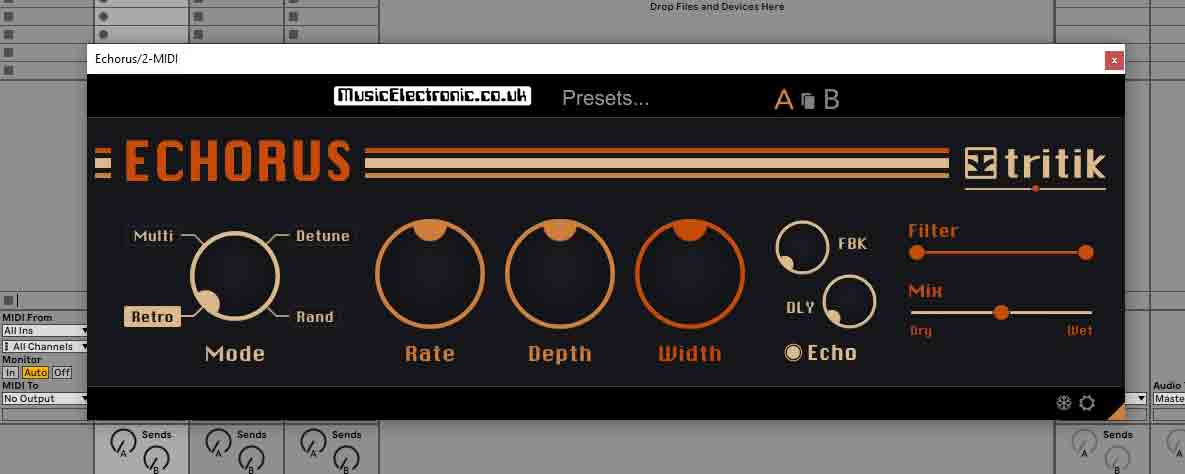
The Echorus has rate and depth controls. It also has a width control to make the source sound wider in the stereo field.
You can also switch it between one of four different modes. Each sounds different so it’s worth giving each a listen. There is an echo section at the end of this plug-in which is independent of the chorus effete.
It’s a simple unit, but it’s worth playing around with a simple unit first if you are a beginner because, with some of the more complex units, it is easy to get a bit overwhelmed and lost. So start simple.
The Choric plug-in

While there are a lot of chorus plug-ins around that focus on trying to recreate the sound of older hardware units there are some that just aim to give you more controls and sound-shaping possibilities.
The Choric unit is one of these devices. Personally, this is one of my favourite and most used chorus units especially on vocals. It has a specific set of presets especially for vocals. This will give you a good starting point and you can hear exactly what’s possible with this type of chorus however don’t let that stop you from tweaking the controls and experimenting for yourself.
The Choric can also shift the pitch of the vocal and mix it back with the original as well as having a filter built into it.
Whereas you are usually stuck with the way the delay is modulated in most chorus devices, you can alter the waveform here, or even set it to random. This goes some way to getting rid of the cyclic side effect with chorus units. You can also alter the phase of the modulating waveform there are plenty of other controls such as looseness and spread.
The Choric takes the standard chorus effect and gives you control of the things that made the chorus problematic for vocals.
I mentioned in the introduction that chorus was usually steered clear of lead vocals. This is because it could smear the vocals and make them distant losing their definition. If you want to experiment with chorus on vocals the Choric makes it a lot easier than using something that recreates an older device.
Tip
To get a good vocal sound, you need a decent recording to start with. I’ve found a good place to record my vocal tracks that sounds surprisingly good.
Final thoughts about the chorus effect on vocals
Traditionally the chorus effect was achieved with very short delay lines.
These were produced using varying methods but they all had side effects. The most popular way was with a BBD (bucket brigade delay line). The more delay they produced, the more side effects and audio artefacts they produced.
This became part of their signature sound and while it suits lots of things like guitars or keyboard sounds, it’s more noticeable on natural sounds like vocals.
That’s why I use things like the Choric as it doesn’t set to imitate all the things that made these older chorus effects sound like they did. The vocal is a very specific sound and it’s easy for the ear to pick up when it sounds wrong.
If you are having difficulty finding the right chorus sound and plug-in check out my guide and roundup of chorus plug-ins.
Along with chorus, reverb is a very popular effect to use on vocals. If you find yourself using too much reverb on a vocal try using ducking reverb. Using ducking reverb is a way to put reverb on a track without blurring it, or making it sound distant.
It’s worth bearing in mind that if the sounds are not great to start with it’s an uphill battle to improve it. Make sure you have a good vocal track. that starts with making sure you’re recording your vocals in a good place.
Chorus is just one of the effects at your disposal. There are lots of other recording effects to help your sound.